Module 09 · Signature AR builds
The 3D town as a diorama on your table
At the endA 2D world rebuilt as a diorama on your table
- Time
- about 50 min
- Level
- Advanced
- You need
- Blender (headless scripts written by the agent) · Unreal Engine 5.x with the Python Editor Script Plugin (path A and the showpiece) · Unity 6 or 2022.3 LTS with Meta XR SDK and MRUK (path B) · Claude Code or Codex
- Before this
- From a 2D retro world to a 3D town · Space Setup and anchors: use what the Quest already knows · From raw mesh to Quest-ready asset · Measure before you optimise · A Windows PC with an RTX-class GPU for Unreal and Lumen; a USB 3 Link cable for path A
Evidence: reconstructed steps to test in your own build.
What this lesson covers
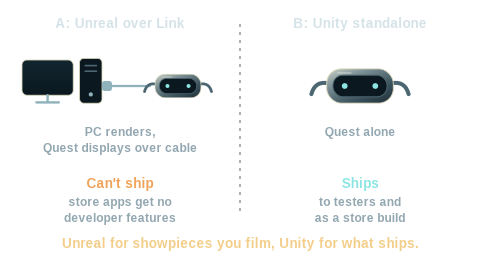
Your 3D town stands on your real table or bed in mixed reality, either over Link from the PC or as a standalone Quest build. Which AR path to choose, what made it feel like an object, card 4 of the prompt chain, the budget for tiny figures, and what to tell the agent when it goes wrong.
- Choose between Unreal over Link (developer-only, PC) and a Unity standalone build, and know why
- Place the diorama on a real surface at miniature scale with a holographic rim and tiny figures on a budget
This lesson is part of full access
You can see above what it covers. The steps, prompts, code and downloads open with full access: all 46 lessons for €49, paid once.