Module 07 · Performance and shipping
Measure before you optimise
At the endAn A/B harness that names the real bottleneck
- Time
- about 40 min
- Level
- Intermediate
- You need
- Unity 2022.3 LTS or Unity 6 with Meta XR SDK · Claude Code or Codex · adb (comes with Unity's Android tools) · OVR Metrics Tool (optional), Unity Profiler (optional)
- Before this
- When it breaks: debugging on the headset · A Quest app with at least one expensive visual effect you suspect
Evidence: documented practice with some reconstructed steps.
What this lesson covers
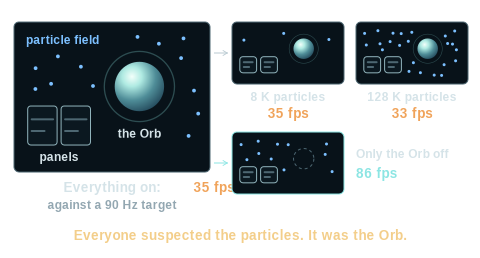
Why the obvious suspect is usually innocent, what Quest frame budgets really are, and how to get your agent to build an A/B harness that switches features on and off per run and hands you one table. Includes the real orb hunt that took my app from 35 to 90 frames per second.
- Know the Quest frame budgets and tell a GPU-bound frame from a CPU-bound one with a single toggle
- Have your agent build an A/B harness (launch toggles, a perf log line, a run script) instead of guessing
- Read an A/B table the way the AETHER Studio orb hunt did, and spot an unfair measurement
- Ask for latency as median, high percentile and outlier share, not as an average
This lesson is part of full access
You can see above what it covers. The steps, prompts, code and downloads open with full access: all 46 lessons for €49, paid once.