Module 07 · Performance and shipping
Release engineering for XR apps
At the endA release pipeline where every step is a gate
- Time
- about 45 min
- Level
- Advanced
- You need
- Unity 2022.3 LTS or Unity 6 with Android Build Support (incl. OpenJDK) · aapt and apksigner from the Android SDK build tools (Unity ships them) · Claude Code or Codex, git, a password manager
Evidence: documented practice with some reconstructed steps.
What this lesson covers
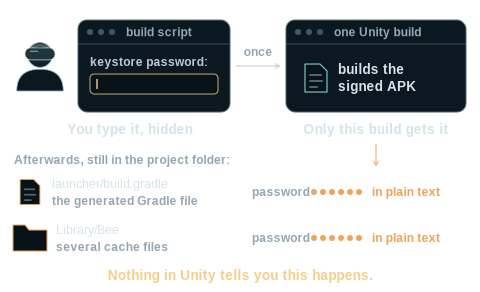
The release traps nobody warns you about (a keystore password left in Unity's caches, version codes, a key change that wipes saved data, manifest surprises, "successful" builds that are broken) and the prompts that make your agent build a release pipeline with a gate for each. Plus loud failures, privacy-safe diagnostics and the clean-machine test.
- Know where a release build leaks secrets and how a signing key change destroys user data
- Have your agent build a release pipeline where every step is a gate (signing, scrub, version code, manifest, build log, receipt)
- Keep test builds away from the submitted package and share one headset safely between agents
- Make failures loud with sentences users can act on, and diagnostics that contain no room data
- Run a clean-machine test and write down what it does not cover
This lesson is part of full access
You can see above what it covers. The steps, prompts, code and downloads open with full access: all 46 lessons for €49, paid once.