Module 05 · Your room as a world
Space Setup and anchors: use what the Quest already knows
At the endContent anchored to your real table
- Time
- about 40 min
- Level
- Intermediate
- You need
- Unity 2022.3 LTS with the Meta XR Core SDK and Meta MR Utility Kit (same version) · Quest 3 or 3S · Claude Code or Codex
- Before this
- Passthrough, placement and your first interaction · Debugging on the headset · Space Setup completed on your headset, with at least walls, floor and one table
Evidence: documented practice with some reconstructed steps.
What this lesson covers
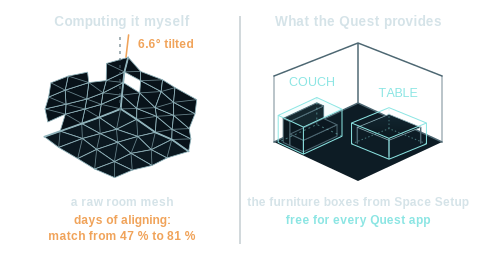
Your Quest already knows your room. Walls, floor, ceiling and labelled furniture from Space Setup, anchors that stay on real spots, and Meta's MR Utility Kit to read them. What that data is good for, where it lies, the one design mistake that moved my whole room by 0.42 m, the boundary-pause test that proves you avoided it, and how to keep room data private.
- Know what the Quest's scene model contains (walls, floor, ceiling, labelled furniture boxes, global mesh) and where it is inaccurate
- Get content placed on the right real table, attached to anchors instead of frozen coordinates, with a loud failure when there is no room
- Prove anchoring with the recentre and boundary-pause test
- Keep room data private by default
This lesson is part of full access
You can see above what it covers. The steps, prompts, code and downloads open with full access: all 46 lessons for €49, paid once.