Module 05 · Your room as a world
Occlusion and depth
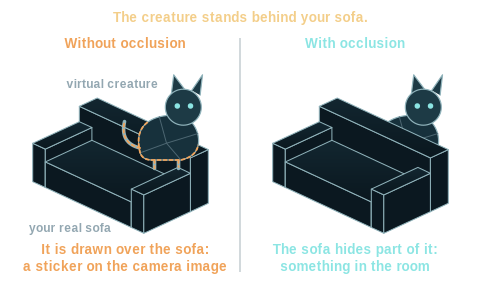
At the endVirtual objects that hide behind real furniture
- Time
- about 35 min
- Level
- Intermediate
- You need
- Unity 2022.3 LTS (Built-in render pipeline, as in the starter), Meta XR Core SDK, MR Utility Kit · Quest 3 or 3S · Claude Code or Codex
Evidence: documented practice with some reconstructed steps.
What this lesson covers
How virtual objects disappear correctly behind your real furniture, walls and hands. Depth-only occluders from Space Setup, the Depth API and the hand mask, and when each wins. The insider numbers that stop false hiding (walls occlude from 0.30 m behind, never the ceiling, 15 cm keep-out), and the traps that black out virtual worlds or turn passthrough white.
- Explain why virtual objects look pasted onto passthrough and what "writing depth without colour" does
- Choose between scene occluders, the Depth API and the hand mask, and combine them
- Get room occluders with the wall offset and keep-out gap that prevent false hiding
- Recognise and fix occluders blacking out virtual worlds, post-processing that whitens passthrough, and wrong alpha
This lesson is part of full access
You can see above what it covers. The steps, prompts, code and downloads open with full access: all 46 lessons for €49, paid once.