Module 04 · AI-generated 3D assets
From raw mesh to Quest-ready asset
At the endAn asset inside a budget you measured
- Time
- about 60 min
- Level
- Intermediate
- You need
- Blender (free; driven headless by your agent) · Unity with Meta XR SDK (the Module 02 starter project) · Mixamo (optional, for humanoids) · Claude Code or Codex
- Before this
- From image to 3D model · Passthrough and interaction
Evidence: documented practice with some reconstructed steps.
What this lesson covers
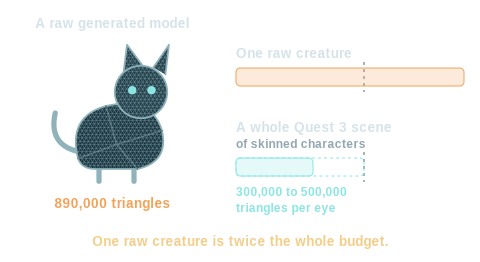
What "Quest-ready" actually means in numbers (triangle budget, LODs, texture size, PBR maps, real scale), why a raw generated mesh is unusable on a Quest, and how to let your agent weld, decimate, retopologise, rig, export and import it while you check the proof and judge the creature standing on your real floor.
- Know the budget a creature must hit on Quest 3 (triangles per LOD, texture sizes, maps, materials) and why
- Brief your agent to make a generated model Quest-ready and demand numbers and renders as proof
- Recognise the typical failures (shell soup, flipped faces, empty weights, wrong scale, dropped clips) from the evidence
- Put the creature on your real floor at its real size and judge it there, large, from four angles and in motion
This lesson is part of full access
You can see above what it covers. The steps, prompts, code and downloads open with full access: all 46 lessons for €49, paid once.