Module 04 · AI-generated 3D assets
Rigs and animation, explained
At the endYou can judge a rig, its weights and its clips
- Time
- about 20 min
- Level
- Beginner
- You need
- A coding agent (Claude Code or Codex) · Optional accounts: Mixamo (free), Tripo or Meshy
- Before this
- From image to 3D model
Evidence: the core workflow is documented in practice.
What this lesson covers
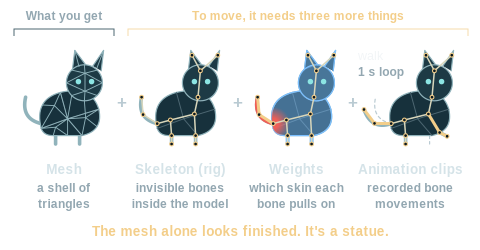
Why a generated 3D model can't move on its own, what a rig actually is, and the four ways I get characters moving, from free libraries to letting the agent animate. Where to get assets, what you're allowed to use, and exactly what to tell your agent.
- Understand mesh, skeleton, weights and animation clips well enough to judge what your agent delivers
- Know where ready-made models and animations come from, and what you may use commercially
- Pick the right one of four routes for your character
- Brief your agent in two or three sentences instead of teaching it Blender
This lesson is part of full access
You can see above what it covers. The steps, prompts, code and downloads open with full access: all 46 lessons for €49, paid once.