Module 08 · PC VR or native Quest
PC VR or native: choosing your platform
At the endA platform decision backed by a measurement
- Time
- about 45 min
- Level
- Intermediate
- You need
- Meta Quest 3 or 3S · A Windows PC (a gaming GPU only if you choose PC VR) · Meta Horizon Link app (only for PC VR) · Unity 2022.3 LTS or Unity 6 with Meta XR SDK; optionally Unreal Engine 5 for PC showpieces · Claude Code or Codex
- Before this
- Setup: the three things only you can do · Measure before you optimise (recommended)
Evidence: documented practice with some reconstructed steps.
What this lesson covers
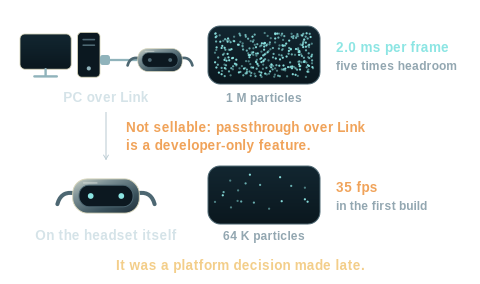
Does your app run on the headset's own mobile chip, or on a PC that streams every frame to it? The choice decides your GPU budget, your testing loop and whether you can sell the result at all. Measured numbers from my projects, what is developer-only, a decision table, a 30-minute feasibility probe your agent runs on the real hardware, and the hybrid design (Quest app plus PC on the local network) I ended up using most.
- Explain the two worlds (standalone app on the headset, PC frames streamed over Link or Air Link) and what each costs in GPU time, latency and image quality
- Use measured numbers from real projects to judge whether an idea fits a Quest 3 frame budget
- Know what is developer-only over Link and why a sellable mixed reality app has to be standalone
- Pick a platform and engine with the decision table, and have your agent measure your heaviest effect on the target before you build features
- Brief a hybrid setup (Quest app plus PC bridge on the LAN) that keeps keys off the headset and refuses strangers
This lesson is part of full access
You can see above what it covers. The steps, prompts, code and downloads open with full access: all 46 lessons for €49, paid once.