Module 08 · PC VR or native Quest
Running PC mixed reality over Link
At the endMixed reality over Link with a clean XR session
- Time
- about 50 min
- Level
- Intermediate
- You need
- Meta Quest 3 or 3S, a USB 3 cable (or a 5/6 GHz Wi-Fi network for Air Link) · Windows PC with a Link-capable GPU, Meta Horizon Link app · Unity 2022.3 LTS or Unity 6 with Meta XR SDK, or Unreal Engine 5 with OpenXR, or your own OpenXR app · nvidia-smi (NVIDIA GPUs) · Claude Code or Codex
- Before this
- PC VR or native: choosing your platform · Release engineering for XR apps (desktop self-test and exit codes)
Evidence: documented practice with some reconstructed steps.
What this lesson covers
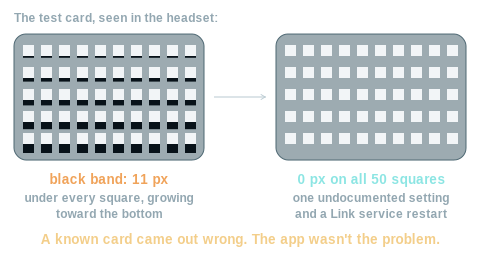
Link is a good development tool, undocumented in exactly the places mixed reality needs. How to set it up for passthrough, the session rules I copy into every PC XR app, the undocumented tuning that fixed black rims and second-long lag (and why it can break with any update), and a catalogue of real Link failures written as "what you see, what you tell the agent".
- Set up Link for mixed reality development, with the right OpenXR runtime and the developer switches passthrough needs
- Know the seven XR session rules and have your agent audit an app against them
- Split the blame between app and transport with a test card, and treat undocumented Link tuning as fragile, measured and reversible
- Diagnose Link failures from a catalogue of real symptoms and the sentence to give your agent
- Know when desktop testing, a launcher with exit codes or an out-of-process viewer is the right tool
This lesson is part of full access
You can see above what it covers. The steps, prompts, code and downloads open with full access: all 46 lessons for €49, paid once.